
Remember 3 years ago, when Ngoc started writing the first sharing lines on her blog. At that time SEO was something that was out of her league.
Ngoc once thought that to do SEO, you need to go to school, be an expert, and SEO is not for those who are… normal!
Is that so?!?!
The concept of SEO may have been pushed by too many “experts”. They brought too many technical factors and made bloggers feel SEO as an area not for ridiculous people!
It is wrong, all that is completely wrong! And if you are being “deceived” by “experts” about SEO, you need to read this article!
Ngoc will write it for you, by putting herself herself around 3 years ago when she did not even know what SEO stands for!!!
If you are blogging and you are looking to learn about SEO then ignore all concepts like this:
SEO (Short for Search Engine Optimization) is the solution to design and optimize information to help the Website become more search engine friendly (Search Engine) combined with Online Marketing methods to improve search results rankings on search engines like Google, Youtube, Facebook …
It does not help you, it just messes you up! Let’s start!
50 SEO TIPS FOR BLOGGER
Ngoc will divide these 50 SEO tips into 5 main areas, and you only need to do that. It is enough!
Content:
- Hosting and technical issues
- Blog interface (theme)
- SEO and Plugins analysis tool
- Optimize SEO for posts
- Blog layout and navigation
HOSTING (BLOG STORAGE) and TECHNICAL ISSUES
#1. Hosting: Choosing and using a good quality hosting will increase page load speed, reduce response time and thereby increase ranking factors, improve user experience.
Hosting is a very important factor and greatly affects SEO issues. Ngoc recommends using HawkHost hosting service to start a blog (select location in Hong Kong or Singapore) or use hosting by Azdigi (Ngoc is using here) to give the fastest loading speed if the audience that you are looking forward to is living in Vietnam.
#2. Always keep your blog on your own host. There are many services that allow you to create a free blog. However, Ngoc certainly asserts that if you want to blog professionally, want to develop your blog into a brand, a business Online businesses and you really care about SEO, please host your blog on a private host!
# 3. Choosing a blog theme: Choosing a blog theme is always a deciding factor in the success or failure of blog development. With all of your experience, Ngoc recommends focusing on one topic that you are most interested in. Embracing too many topics for a blog will certainly make SEO work as well as search ranking will be significantly affected.
Search engines and especially Google always value blogs with unique and specific topics. From a user perspective, it will be easier for readers to remember you, a personal brand blogger, leading in one field instead of no field. They will be tangled! 😕
#4. Domain name: If it is possible to include keywords in the domain name, do not choose a domain name on the principle of memorable, concise, exudes your personal brand. Prefer and try to choose the .COM / .NET domain name extension or maybe choose a national domain name like .VN
Do not miss: Podcast # 5: The art of pun in choosing a domain name for Blog!
# 5. Should we use the www prefix? Personally, Ngoc does not like to use the www prefix before a domain name because she simply prefers simplicity. Also having or not completely does not affect SEO. If you want to change from prefix www to none then use 301 redirect method (Permanent Redirect)
# 6. HTTP & HTTPS: The https protocol will definitely be the standard protocol and will always be rated and ranked higher by Google. Normally, to use https protocol, you need to buy an SSL certificate, but if you are planning to create a new website or blog, please see this article to know how to install and activate the free https protocol.
# 7. Choose the best CMS platform: CMS is also known as a content management system, now there are many CMS for you to blog. However, you should choose WordPress, because this is an open source most used (27% of the total website up to the present time).
WordPress has also proven to be the best SEO-enabled CMS, having the largest user community. WordPress is also the most frequently updated source code from which the level of security is also very secure.
#8. Sub-Domain and Sub-Directory:
A sub-domain usually takes the form: blog.ngocdenroi.com (this is also known as a subdomain)
A sub-directory usually takes the form: ngocdenroi.com/blog (this is also called a subcategory)
So sub-domain or sub-directory would be best for SEO? The answer is that depending on the purpose of your SEO, if you are looking to build a new field (eg a course, a training program, a new service …) then choosing to use a sub-domain will be more beneficial. Google will treat the sub-domain as a separate website with its own XML sitemap.
If you want to increase the ranking of your current blog, then sub-directory selection will be better for SEO work.
INTERFACE (THEME)
# 9. Why is important for SEO: When we start blogging, we often do not care (sometimes we do not know) themes that affect SEO a lot. Because the theme is created from coded lines of code, if you use a well coded theme, it will definitely support SEO very well and increase page load speed. Which increases page loading speed is also a leading factor in SEO work.
#10. Theme copyright: If you use WordPress, there are many free options in the theme store to use at any time. Ngoc personally used to use a free theme when writing a blog. But it must be said that when deciding to invest in a copyright theme, the effect on SEO, user experience is completely changed.
Therefore, from all personal experience, Ngoc would recommend that if possible use a copyrighted theme. Surely your investment will only be profitable but never loss, Ngoc currently believes in the theme of MythemeShop and feels really satisfied.
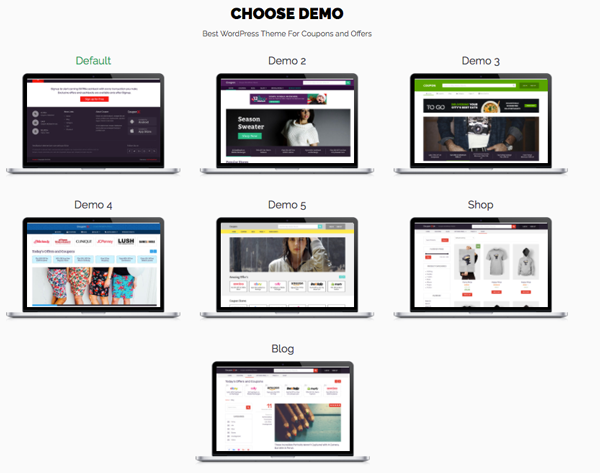
Reference: MyThemeShop Review: A complete ecosystem for WordPress users!
# 11. User experience: If you have good, valuable content but you do not create a good user experience, then your SEO job will be considered a failure. A website that attracts users, keeps readers engaged for a long time (on- time), and has a high return rate will be ranked by search engines.
So how to increase user experience? Personally, Ngoc likes to focus on a well-designed and well-navigated interface. And MythemeShop is the company that provides the WordPress theme that is doing very well.
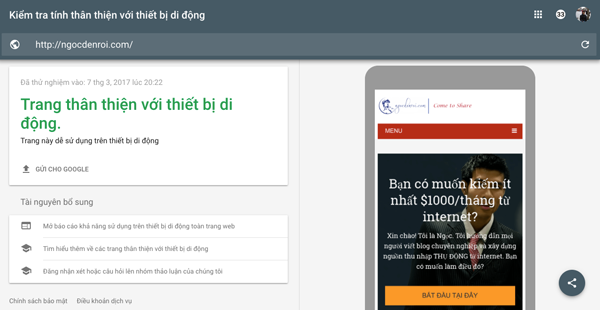
# 12. Responsive mobile friendly: Mobile-friendly factor is a priority element that Google is promoting because the number of users of mobile devices is increasing. Even Google has stated that websites that display well on mobile devices will be prioritized for better indexing.
So, take a minute to check your mobile friendliness with Google Mobile Experience tool.
SEO AND PLUGIN ANALYSIS TOOL
# 13. Google Analytics: A free Google tool that any blogger needs to use to track traffic statistics.
When using Google Analytics, you will know what devices users use to access the blog, how old they are, their interests … A lot of information to help you evaluate and improve SEO factors on your blog. To install Google Analytics, please see this article.
# 14. Google Search Console: Formerly known as the Google Webmaster Tool, has now been renamed to Google Search Console. If Google Analytics allows you to statistically and evaluate external factors of the blog such as traffic, user statistics, then Google Search Console helps you evaluate the “health” of the blog such as reporting on search keywords, backlink statistics and check for errors occur …
These reviews will help you adjust and improve your SEO work a lot, so install Google Search Console for the blog and then connect to your Google Analytics account right away.
# 15. Google AMP: Known as Accelerated Mobile Pages (AMP) is an open source initiative to make web pages load quickly and have a nice interface on mobile devices, even when the internet is slow.
Google also claims that if your website or blog complies with AMP, it will benefit them in Google search results, your ranking will also increase. So, you need to learn about Google AMP and take a few minutes to set up and install AMP for the blog.
# 16. Create an XML sitemap and send it to Google: XML Sitemap is understood as a map of a website or blog. A sitemap is a list of pages on a website.
XML sitemap helps search engines like Google know which links are important and how to update the content of the website? How often? Sitemaps do not directly help increase your website or blog rankings but it helps search spiders (search engines) collect information, index better then rank keywords faster. Here are instructions for creating an XML Sitemap and sending it to Google.
# 17. Set a ping list: What do you do when you post an article on the blog so it is quickly displayed on search results? The fastest way is to create a ping list to the search engines to “notice”. This will help increase the index speed significantly.
# 18. Increase page load speed: Also known as loading speed, this is a leading factor for Google to evaluate and rank a website. To increase page load speed, there are many things to do and depend on many factors (stated in this article) such as using optimized themes in code, good quality hosting …
Experience should by all means make the page load speed under 3 seconds, to test the loading speed you can use the tool Pingdom or Google’s PageSpeed Insights tool.
# 19. Check display – indexing on search results: WordPress has a setting so that search engines do not index and display results. The purpose of this is to help you prepare the content, complete the blog before publishing to everyone.
However, if you accidentally choose this item, then no matter how good you have SEO, it will not work. So, make sure this item is not selected. Visit the admin page of the blog, then navigate to Setting -> Reading
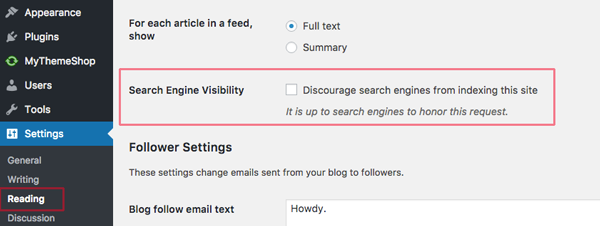
In the Search Engine Visibility section uncheck the box “Discourage search engines from indexing this site”
# 20. Use the cache creation plugin: One of the best ways to speed up page loading is to use a cache plugin for your blog. The cache plugin preloads and caches your blog content so you do not have to wait to visit the blog again.
The best free cache creation plugins can be WP Supper Cache or W3 Total Cache. In addition, if possible, you should also consult the WP Rocket plugin, a paid plugin besides the cache creation function that helps optimize and clean the database to speed up the best WordPress blog today.
# 21. Yoast SEO Plugin: This is the best and most used SEO support plugin. Certainly, if you are a blogger and are using WordPress then Yoast SEO is an indispensable plugin. This is the guide to install and configure Yoast SEO plugin for your reference.
# 22. Sucuri Security Plugin: Security is always a concern, if your blog is hacked you may get bad links, malicious code … without your knowledge. WordPress security enhancement is quite simple, you just need to perform some configuration and install the Sucuri Security plugin according to this guide.
OPTIMIZE SEO FOR ARTICLES
# 23. Keyword Research: Before writing a blog post, you should ask: What keywords do you want people to find this article for? This is the question that helps the team determine the target keyword for the article.
Then use keyword research tool Keyword Planner to determine the number of search keywords (you need to set up a Google AdWords advertising account to use this tool). You can also use KeywordTool.io or KWfinder to search for keywords related to the main keyword.
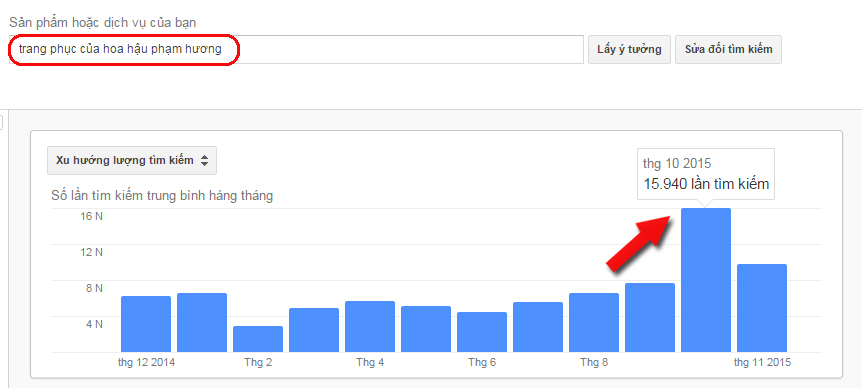
# 24. Long keywords and short keywords: Experience shows that long keywords will be easier to rank on the search engines. A lot of new bloggers often try to SEO short keywords, so it is very difficult because short keywords are often very competitive so it is difficult to SEO.
For example, if you use the SEO keyword “Men’s watches” then this will be a short keyword and very difficult to SEO. So why not choose the long keyword “Genuine casio watches for men in HCM”. This is a long keyword and will easily reach the searcher because it is more specific about the product, brand, target audience and location.
Not to be missed: Keyword research guide – how to create an article to get 10,000 hits per month!
# 25. URL: It is the path of the article, always make sure it is a short URL and contains keywords that need SEO (usually should keep the URL 3 to 5 words or 30 to 60 characters is best)
# 26. Article title: Write an attractive title for the user to increase the click rate on the article, in addition try to keep the title short (no more than 65 characters) and always contain the main keyword that needs SEO the best. For WordPress, the article title is also the H1 tag.
# 27. Use numbers & words for high clickthrough rates in titles: Experience from many bloggers shows that when writing a title should include numbers, this makes the click rate of the article very high. Numbers make sure users know how much benefit they get when they click through to read an article.
Ask yourself whether you are reading this article by Ngoc because of the title “50 best SEO tips for bloggers”. At some point, the number 50 has worked well, right?
In addition to the numbers, words like “best” “effective” “rated” “secret” “case study” … will also help the click rate of articles be greatly improved.
# 28. Keywords appear in the first paragraph: This is a factor that greatly affects the optimization of the article. Keywords should appear in the first paragraph of the article and within the first 150 words are best.
# 29. H2 tag: Each article must contain at least one H2 tag and should contain the main keyword.
Do not overlook: Using the best Heading tag for SEO is like this!
# 30. Tags H3, H4, H5, H6: Not required but if the article is long, you should use these tags to layout the article more clearly. Keywords related to the main keyword that appear in these tags are great for SEO. Remember my words!
You can find keywords related to the main keyword at the bottom of the Google search results page.
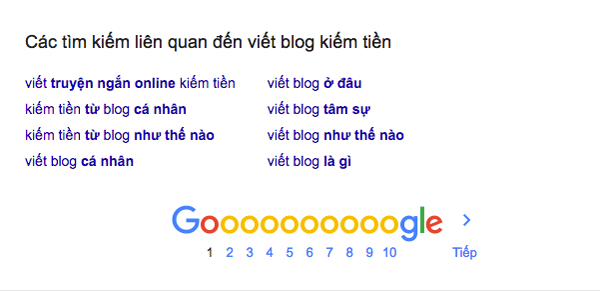
# 31. Keyword Distribution: Although the method of “stuffing” or “spam” keywords is not recommended, try to repeat the main keywords or related keywords in the article naturally.
# 32. Internal Link: Also known as internal linking has many effects in SEO. Firstly, it helps reduce bounce rate, but the lower the bounce rate, the higher your blog rank.
Second, internal links make it easier for GoogleBot (search spiders) to crawl content and index your blog posts. So, when posting a new post, try to link to at least 3 old posts. (Count to see how much internal links Jade uses in this article)
# 33. External Link: As an external link, you should have at least one external link to reputable websites. This is how you provide additional information to readers. For example, you can link to Wikipedia if you need to explain a term.
# 34. Affiliate Link: Most bloggers, including Ngoc use affiliate links to make money from blogs through affiliate marketing programs. However, if you have too many links in a page, it is not a good thing. Google reviews pages that place too many affiliate links and sees this as a spam action.
Ngoc’s experience shows that you should choose the most suitable affiliate marketing programs and should not place more than 3 affiliate links on an article. Also, you need to use at least one plugin to hide the link using the Link Cloaking method.
# 35. Backlink building: Back links are links that are linked to your blog. This is an important factor that Google uses to evaluate the reputation and rank of a website or blog. Because of the power of backlinks to SEO, many bloggers strive to build backlinks by buying backlinks.
This is completely wrong, all unnatural backlinks lead to consequences and can be more damaging, heavier than you can be punished by Google like de-index … So, do not take risks. Ngoc advises you that the best way to build backlinks is to focus on creating high quality and useful content for readers. Connect with other bloggers and build relationships with them, then your backlink will grow naturally.
This is the most sustainable and safe strategy, do not try to surpass Google, you will fail! Really!
# 36. Use images: One thing is indisputable that images with images will be more attractive than full-text articles. Although Google does not recognize what is an image, what is the text, but certainly if there is an image, you will partly help readers more interested in the article.
Useful for you: How does image SEO let Google “love” you?
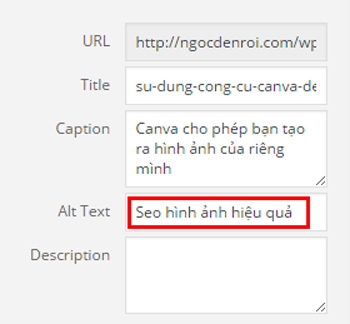
# 37. Alt Tags: As mentioned above Google and other search engines do not recognize the image but if you add a description for the Alt tag, everything will be the opposite. The Alt tag has the function of “notifying” to Google what the image is about. So never be lazy and forget to add Alt tags for your images!
# 37. Reduce size and image size: One of the leading causes of slow page load speed is that you use images with large size, high capacity. Ngoc always finds ways to reduce the image size to less than 100kb. An online image compression tool like TinyPNG is a solution, and the WP Smushit plugin will help compress your images automatically every time you upload them.
# 39. Video: Adding videos to an article is extremely helpful when you want the article to rank high on search engines. If your own video will be the best, but if not possible, search for related videos and embed in the article. Articles with videos are always appreciated by Google and of course you will also have the opportunity to “keep” readers to stay longer on the blog (on-time time is high).
# 40. Write long articles: Long posts are always rated and ranked by Google, long content also helps users stay in your blog longer (increasing On-time). But when users online on the blog for a long time, surely your SEO score is higher!
# 41. High quality content: This is the most important factor for a blog’s success. Articles are long but the content needs to be unique and useful for readers. Ngoc personally recommends that you write to users, that is, forget about Google and focus on your readers first. If readers find it useful, everything for Google will be solved. 😉
# 42. Frequency of posting: A blog that attracts users is a blog that is constantly updated with content. Never post massively and then take a break … for a few months, plan to post and try to publish at least 1 article per week.
Regular posting also helps Googlebot (search spider) return to your blog and update, index new content regularly. This in the long run is great for SEO work.
# 43. Comment and always respond to comments: The power of blogs is the interaction through the comments in each article. If you want to become a popular blogger, please reply with all your comments.
The more comments you have, the more interactive your blog is and the longer the content of the post. (Blog comments are counted as article content.)
However, always make sure that your comments are from real users, not spam. In order to combat comment spam on WordPress blog, Ngoc has a tutorial on Akismet plugin, this is the best plugin to filter spam comments on your blog.
LAYOUT AND NAVIGATION BLOG
# 44. Place important items right on the home page: The blog home page is extremely important to navigate users where you want to go. Make sure that users only need a click to get to the most important pages, categories, and services on the blog.

Menu is the place to help you navigate the best user!
When your layout and navigation are good, the blog sitelink will display very “beautifully” (as shown below) when users type your domain name into Google Search Box.
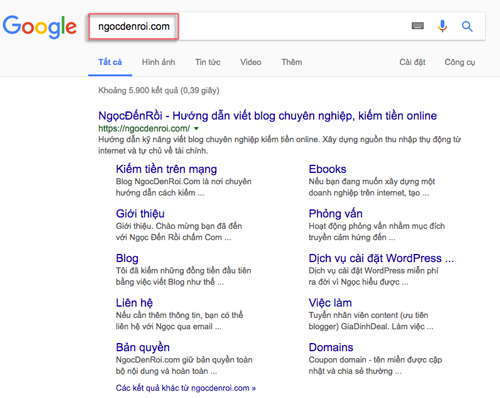
Sitelink’s blog Ngocdenroi.com
# 45. Footer: Also known as the footer area of the blog, this is a good place for you to put links to every corner on the blog. It could be links to social media accounts, email signup frames, or featured categories and articles. Please take 30 seconds to see how Ngoc arranges the footer section!
# 46. Category: Building a category list for blogs is impossible not to do. Categories need to be closely linked to the topic of your blog and make sure the majority of categories are also the main keywords for the blog.
For example: Ngoc writes this blog on the topic of “blogging skills – make money online”. So the main categories are: Making money blogs, Making money online, WordPress basics, blogger interviews …
Or if you blog about food and cuisine, your main categories will be: Recipes, Asian dishes, snacks, restaurant reviews …
# 47. Sidebar categories list: Adding a complete list of categories to the sidebar is a smart way for Google and both users to easily find all the content on your blog.
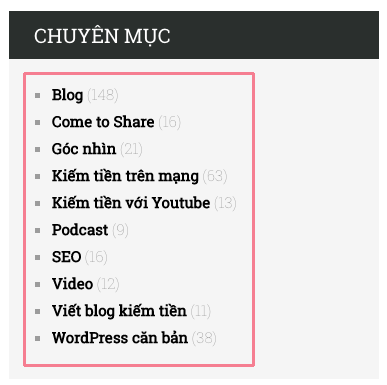
This is a very small tip. But it will help all your articles and categories to be fully indexed on the search results.
# 48. Popup: Popup windows are a very effective way to help you build an email list. However if you abuse too much popup then you can … harm yourself. Recently Google has officially announced a penalty for websites displaying popup windows on mobile devices.
So, if your blog is using too many popups then quickly remove it, Ngoc currently does not use any popup on the blog. If you put yourself in the position of the reader you will not like to be bothered by the popup window?
# 49. Add a share button to social networks. Make sure that posts that get a lot of likes and share on social networks will be a factor that Google highly appreciates. This will also help you significantly increase the traffic.
So, do not lack social sharing buttons on your blog, Ngoc places article sharing buttons right below the headline.
… and the share buttons at the end of the article with a clear call to action.
Share button at the end of the article
# 50. RSS Feed: Google may crawl your blog through the RSS Feed service. Therefore, you should set up a Feedburner account for your blog. Like Ngoc’s Feedburner account, through this account users can monitor blog content, subscribe to newsletters …
CONCLUSION
That is all Ngoc knows about SEO and she wants to share with you. In the end, Ngoc still wants to emphasize to you. Because we are bloggers, let’s write for users, put their experience first!
Because if they feel the content of your article is valuable. They will like. And you will have more and more readers and this is what Google and other search engines want you.
Of course, blog optimization or article optimization also needs its own techniques and things that Ngoc shared all above. Save these tips and apply them daily to improve your blog step by step!
Ngoc will continue to update the SEO tips in the future!
What do you think about these 50 SEO tips? What is your experience in SEO? Or if you have any questions, feel free to leave a comment below for further discussion.